How to Build Trust With Remote Teams Using Time Tracking
How to Build Trust With Remote Teams Using Time Tracking
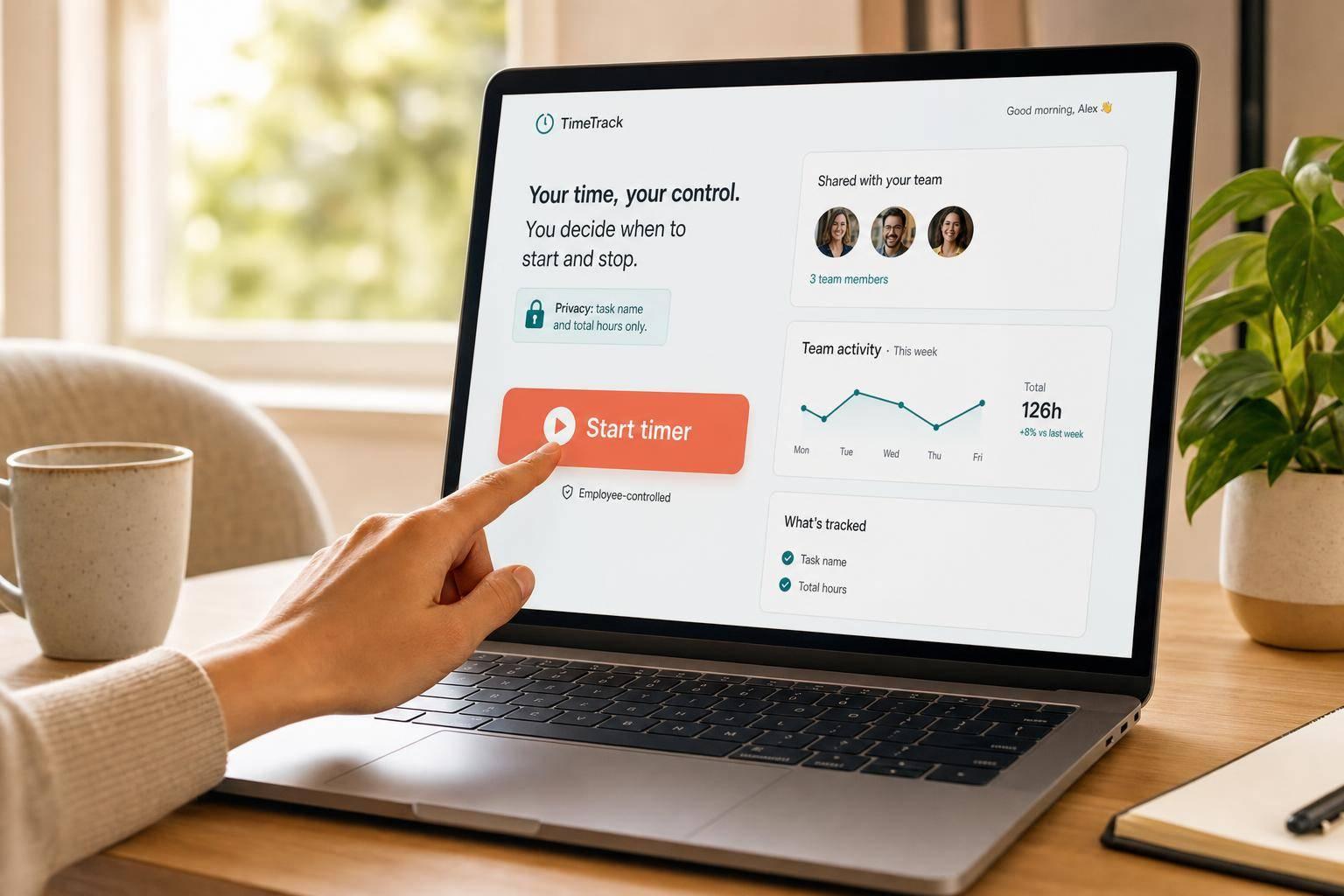
Time tracking builds trust only when people stay in control. If you want remote staff to accept it, I’d keep the rules simple: say what is tracked, limit it to work time, let employees control the timer, and use the data for pay, billing, and workload review - not constant watch.
Here’s the short version:
- Tell people upfront what the tool records
- Set hard limits on what it never records
- Track only during active work sessions
- Let employees start, pause, and stop tracking
- Give employees access to their own logs
- Review time weekly for overload, payroll, and invoices
- Keep access tight and delete old records after 12 months
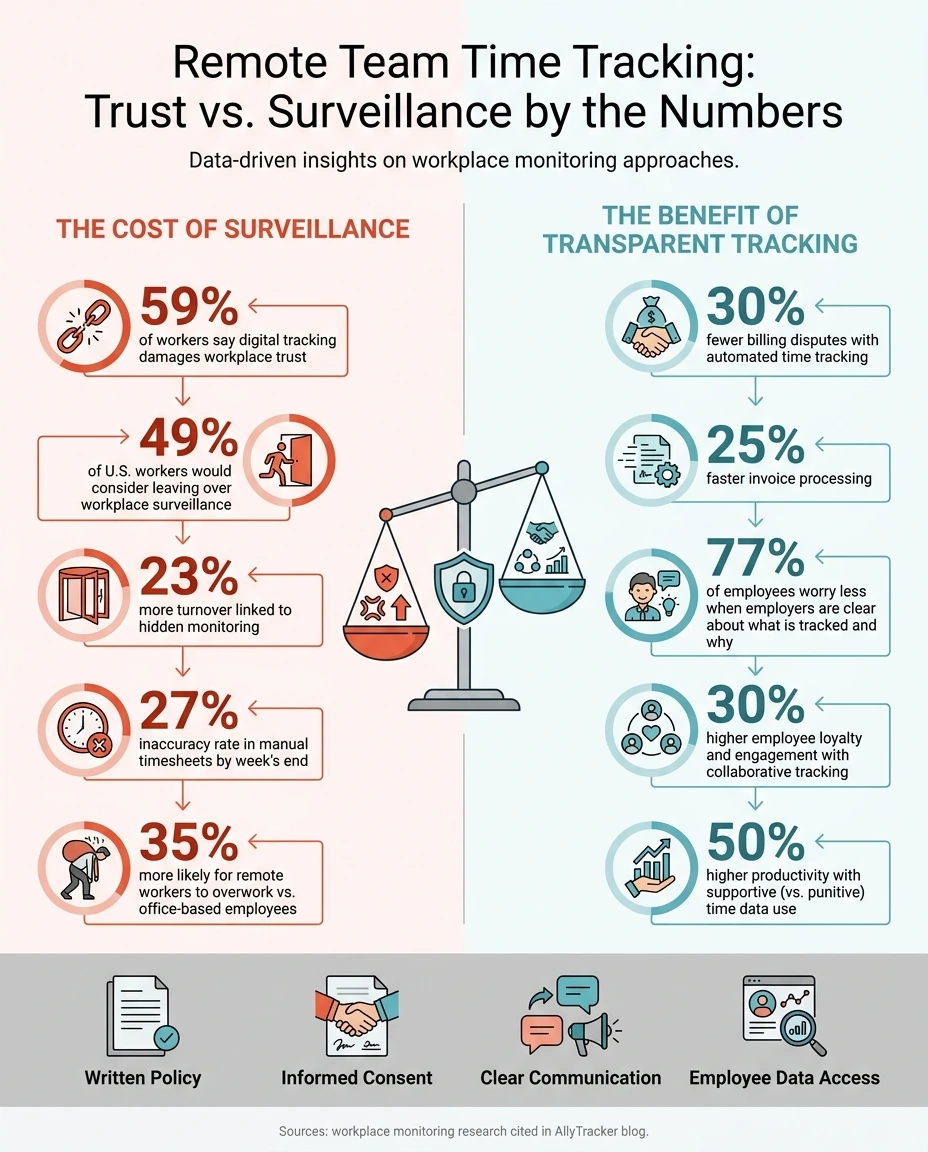
The numbers make the issue clear. 59% of workers say digital tracking damages workplace trust, 49% of U.S. workers would think about leaving over workplace surveillance, and hidden monitoring is linked to 23% more turnover. At the same time, automated time records can cut billing disputes by 30% and help process invoices 25% faster.
A simple way to think about it is this: time tracking should feel like a shared work log, not a hidden watch tool. That means visible tracking, written consent, employee review, and clear limits from day one.
If I were putting this into practice, I’d focus on four things:
- Write a plain-language policy
- Explain the reason for tracking
- Use time data to support staff and payroll
- Set the tool up so privacy controls are on from the start
| Area | Bad setup | Better setup |
|---|---|---|
| Tracking | Hidden or all-day | Only during work sessions |
| Control | Manager-only | Employee start/stop and review |
| Data use | Discipline and pressure | Pay, billing, and workload balance |
| Access | Broad internal access | Direct manager access only |
| Retention | Stored with no end date | Deleted after 12 months |
That’s the whole idea in one view: keep tracking visible, limited, and employee-controlled, and it is much more likely to support trust instead of breaking it.
Remote Team Time Tracking: Trust vs. Surveillance by the Numbers
How to Monitor Remote Employees Without Losing Their Trust - Complete Guide
sbb-itb-338a5ab
Step 1: Write a clear, consent-based time tracking policy
Before you turn on any tracking, write a one-page policy in plain English. Keep it simple. People should be able to read it once and know what the tool does, when it runs, and where the line is.
The big job of this policy is to define what gets recorded and what never gets touched.
Define work time, breaks, and tracking boundaries
Be specific. On the tracked side, list the exact data the tool records: total hours worked, project and task allocation, app and URL usage during work sessions, and overall activity signals like app usage and idle time.
Then draw a hard line around what is not tracked. Say it directly: no keystroke logging, no webcam or microphone access, no personal emails, messages, or files.
Work hours and break rules need that same level of detail. State that tracking runs only during active work sessions. It should stop on its own with an auto-pause after 5 minutes of inactivity. It should also stay off during weekends, holidays, and personal time.
That kind of clarity matters. If the rules feel vague, people tend to assume the worst.
Make employee control part of the policy
Control should sit with employees, not just managers. Employees should be able to start, pause, and stop tracking themselves. There should also be a visible active-session indicator, so people can always tell when tracking is on.
Consent needs to be written down, not implied. Require signed acknowledgment during onboarding before tracking starts. If you're adding tracking for an existing team, give them a 30-day rollout window before enforcement begins.
The policy should also explain who can see the data and how long it stays in the system. In this case, records should be deleted after 12 months.
Comparison table: trust-eroding vs. trust-building policies
The gap between a policy people accept and one they resent usually comes down to control.
| Policy Element | Trust-Eroding Approach | Trust-Building Approach |
|---|---|---|
| Tracking Window | 24/7 or hidden background tracking | Employee-controlled start/stop or defined work hours only |
| Data Visibility | Manager-only dashboards | Shared visibility - employees see what managers see |
| Monitoring Level | Keystroke logging and webcam access | Project, task, and overall activity signals |
| Screenshots | Constant, high-resolution captures | Optional, blurred, or disabled by default |
| Idle Time | Manual deduction or always-on pressure | Auto-pause after 5 minutes of inactivity |
| Data Retention | Indefinite storage | Clear 12-month retention with automatic deletion |
| Primary Goal | Surveillance and discipline | Workload balance and payroll accuracy |
There’s also a practical side to setting these limits. Manual timesheets are roughly 27% inaccurate by week's end, so clear boundaries and automated records can improve payroll and billing accuracy.
Step 2: Tell employees what is tracked, why, and how it helps them
A policy document by itself won't build trust. How you introduce tracking matters just as much as what the policy says. If the rollout feels rushed or unclear, people may read it as surveillance. A good rollout handles the conversation with care, not just the paperwork. And that only happens when managers explain it well from day one.
Use a rollout script that addresses the main employee concerns
Start with the business reason, not the software. People are much more open to tracking when they understand the exact problem it solves. A manager might say: "We use time tracking to make billing accurate and spot overload early." That framing is plain, honest, and tied to outcomes employees care about: correct pay and workloads that don't get out of hand.
Be direct about what employees will see, what stays off-limits, and how the data is used for payroll, billing, and workload balance. 77% of employees report worrying less about monitoring when employers are clear about what is tracked and why.
Give employees visibility into their data and privacy safeguards
Employees should be able to see the same data their manager sees. Shared dashboards remove the one-sided feel that comes with closed-off access. If someone can log in and review their own session times, task notes, and screenshots, they can also explain odd patterns instead of being judged by a partial picture.
Let employees review screenshots, blur sensitive content, and flag captures before they are finalized, even if that changes the session total. That kind of control shows the tool is there to support honest records, not to catch people slipping.
Comparison table: vague communication vs. transparent communication
The line between a team that accepts tracking and a team that resents it often comes down to one conversation. Here's what that looks like in practice:
| Communication Style | Manager Wording Example | Employee Reaction and Outcome |
|---|---|---|
| Vague | "We need to make sure everyone stays productive while working from home." | Feels like surveillance; assumes the worst - employees focus on looking busy instead of doing useful work |
| Transparent | "We track time to make sure client billing is accurate and to help balance workloads." | Sees the tool as fair and protective - employees use the tool honestly and trust the data |
| Punitive | "We'll be reviewing activity scores and idle time every day." | Feels punitive - stress goes up; turnover risk rises by 23% |
| Collaborative | "You have full access to your own data and can add notes to explain why a task took longer than expected." | Feels trusted - 30% higher employee loyalty and engagement |
With shared visibility in place, tracked hours can help rebalance workloads and confirm pay. Once the rollout is clear, the next issue is how the data gets used.
Step 3: Use tracked time for workload balance, pay accuracy, and billing
Once employees can see their own logs, the next step is to put that data to work. Use it to balance workloads, check pay, and bill clients with fewer mistakes.
Review timesheets to spot overload and rebalance work
Look at weekly patterns, not minute-by-minute activity. That’s the key.
If someone is logging far above a normal workweek, shift some of that work elsewhere. A weekly review can flag overload before burnout starts to pile up. Used this way, timesheet review becomes a management tool, not a surveillance habit.
Remote workers are 35% more likely to overwork than office-based employees. For distributed teams, that makes weekly review even more important. It helps managers step in early and shows employees that time data is there to support them, not police them.
Use verified records for payroll and client billing
The same verified records that help with workload planning also protect payroll and client invoices.
They cut payroll mistakes and help invoices go out faster. With automatic time capture, finance teams get clean records they can rely on.
Assign tracked hours to the right project or client billing codes, and invoicing gets much simpler. No one has to piece hours together from memory or hunt through spreadsheets. The time is already sorted by project.
Billing codes also help keep scope creep in check on fixed-price work. Clean records protect employees from pay mistakes and protect clients from invoice disputes. Automated time tracking can result in 30% fewer billing disputes and 25% faster invoice processing.
Comparison table: punitive monitoring vs. supportive use of time data
How managers react to time data shapes the whole process. It can build trust, or it can make people work around the system.
| Approach | Data Focus | Manager Response | Trust Outcome |
|---|---|---|---|
| Punitive monitoring | Keystrokes, screenshots, and idle alerts | Discipline for "low activity" | Resentment; 23% increase in turnover |
| Supportive use | Project hours, task completion, and capacity | Redistribute work for overloaded staff | Loyalty; 50% higher productivity |
| Verified billing | Verified, activity-based records | Clean invoices; faster approvals | Finance and client trust |
| Shared visibility | Employees and managers see the same data | Employees view and edit their own logs | Autonomy; honest reporting |
That gap shows up in retention, billing accuracy, and employee engagement.
Next, configure the tool so managers get the oversight they need without taking autonomy away.
Step 4: Set up AllyTracker to balance oversight with employee autonomy
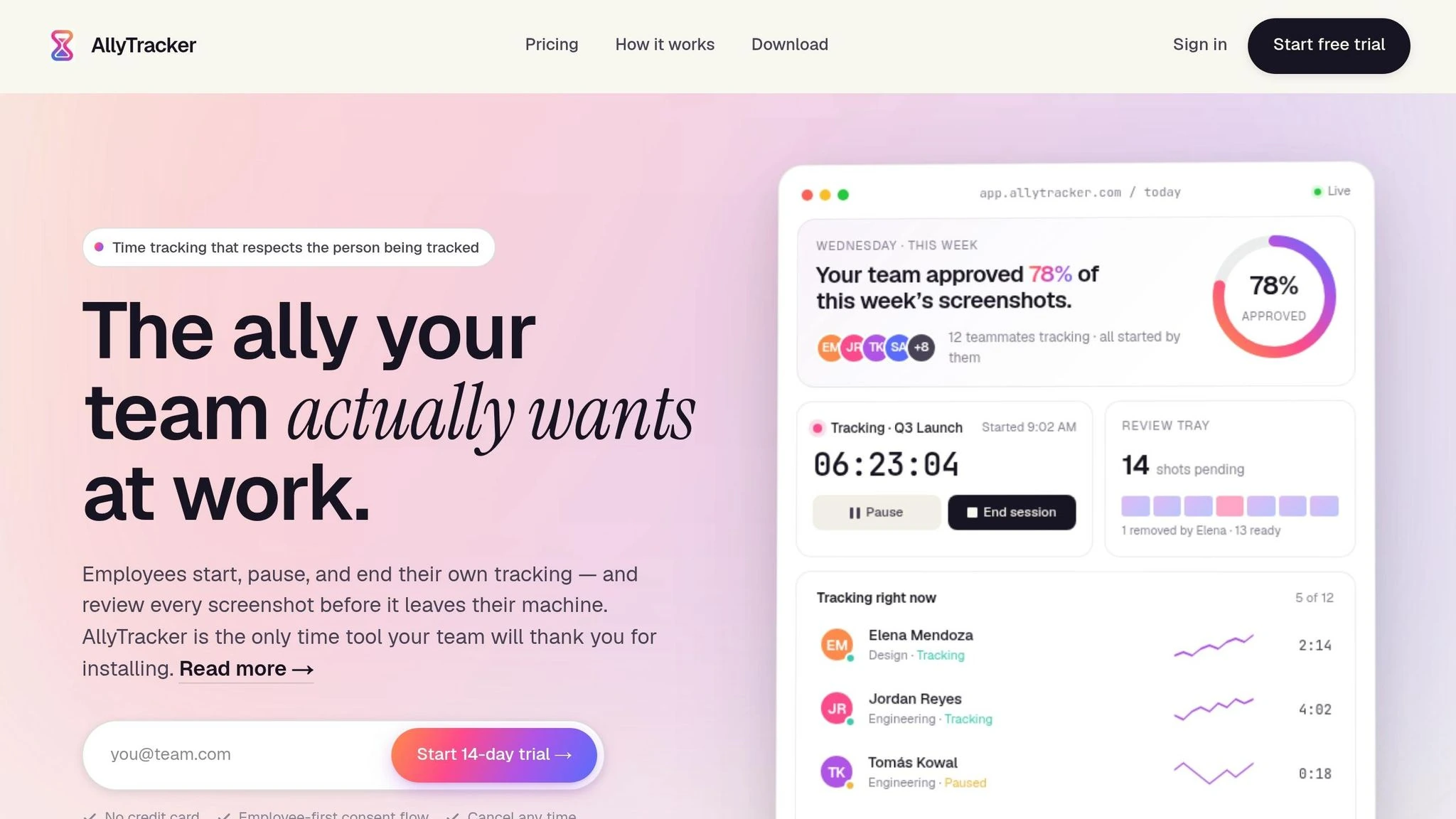
Once employees know what’s being tracked and why, the next move is simple: set up AllyTracker to match those rules. The tool should reflect the policy from the start, with privacy-first defaults, employee control, and tight access limits.
Configure privacy-first tracking settings from day one
AllyTracker comes with privacy-first tracking by default, but that only helps if you set it up that way on day one.
If screenshots are turned on, keep the capture frequency low and blur sensitive content. Tracking begins only when the employee starts the timer, and it auto-pauses after 5 minutes of inactivity. That matters. It means the system isn’t quietly running in the background when someone isn’t working.
Access should stay narrow too. Use role-based permissions so only the employee’s direct manager or team lead can see the data. And before rollout, double-check that keylogging, webcam, and microphone features are turned off.
Use employee dashboards and session notes to support self-management
Once access is limited, employees should be able to see the same records they’re being asked to trust.
Every AllyTracker employee gets a personal dashboard with their own hours, sessions, session notes, and screenshots. Before a screenshot goes to manager review, the employee can check it in private, remove anything unintended, and permanently delete it. If a screenshot is removed, it’s also removed from the verified-pay timesheet.
Session notes add context to logged time. An employee can explain an offline meeting, a task that took longer than expected, or work done away from the screen. That changes the tone of the conversation. Instead of asking, “why was your activity low?” the better question becomes, “what were you working on?”
AllyTracker manager actions and employee trust outcomes
These settings turn policy into daily practice.
| AllyTracker Manager Action | Employee Trust Outcome |
|---|---|
| Set screenshot cadence to low frequency | Employees know when snapshots occur and aren't caught off guard |
| Enable screenshot review and permanent deletion | Employees control their own privacy data |
| Configure role-based access limits | Sensitive data stays with the direct supervisor only |
| Share personal dashboards with employees | Employees self-manage hours, catch overwork early, and verify accuracy |
| Use verified-pay timesheets for payroll | Employees are evaluated on objective, accurate records |
Conclusion: Make time tracking visible, limited, and fair
Remote time tracking doesn't have to feel like surveillance. Trust comes down to four simple practices: a written policy, informed consent, clear communication, and employee access to their own data. That works best when tracking stays visible, limited, and under the employee's control. People are far more likely to trust the system when they can see the rules and manage their own data.
Write the rules in plain English. Spell out what is tracked, who can see it, and how long it's kept. Get consent before rollout, and explain the reason behind it. Then carry that same plain-language approach into the rollout itself, so the team knows why tracking is being used and has a chance to shape how it works.
After rollout, use tracked hours for the right reasons: to spot overload, verify payroll, and support client billing. That shift matters. It helps employees see tracking as a tool that backs them up, not something that watches over their shoulder.
AllyTracker fits that approach with employee-controlled timers, screenshot review, and personal dashboards. Employees can start, pause, and stop their own timers, review screenshots in a private tray before they're shared, and check their own dashboards and timesheets. When time data is accurate, limited, and used fairly, it becomes a basis for trust, not stress.
How do I introduce time tracking without losing trust?
Introduce time tracking as a tool for support and fair treatment, not as a way to watch people all day. Say that upfront. If people think the system is there to police them, trust can slip fast. But if they understand that it helps balance workloads, bill clients with more accuracy, and set deadlines that match the work, the conversation changes.
Be plain about why you're using it. Time data can show when one person is overloaded while someone else has room to take on more. It can help teams avoid guesswork when pricing client work. It can also make project planning less of a shot in the dark, because deadlines are based on actual hours instead of rough estimates.
Trust matters here, and it doesn't happen by accident. Bring the team into the process early, especially when setting policies and choosing a tool. Write down what will be tracked, what won't, and how the data will be used. Give employees access to their own data so nothing feels hidden. And if you're asking the team to use the system, use it yourself. That sends a clear message: the rules apply to everyone, not just the people being managed.
What should never be tracked in a remote team?
To keep trust intact, remote teams should never be put under keystroke logging, webcam monitoring, or microphone tracking. Skip constant screenshots too, unless a client contract clearly requires them.
That same line applies to personal devices, off-hours activity, private messages, minute-by-minute behavior, mouse movement, and even lunch or break times. That kind of monitoring crosses into people’s private space fast.
A better path is to look at the big picture: project patterns, billable percentages, and overall outcomes.
How can time data help prevent burnout?
Time data helps prevent burnout because it shows what people are actually carrying day to day.
That matters. A manager can see when someone is overloaded or putting in too many hours week after week, before their output starts to slip.
With that view, leaders can shift work, move deadlines, or step in with support instead of waiting until someone hits a wall.
It also helps when employees can see their own numbers. They’re more likely to notice when they’re stretched too thin, set limits, and ask for a schedule that makes more sense.