Why Teams Reject Time Tracking at First

Why Teams Reject Time Tracking at First
Most teams don’t reject time tracking because they want to hide work. They reject it because they expect surveillance, unclear rules, and pay mistakes.
From what I see, early pushback usually comes down to four things: privacy, unclear purpose, pay concerns, and a bad rollout. When people can start and stop their own timer, review screenshots, and see their own hours, the reaction often changes.
Here’s the short version:
- Privacy fears come first. Staff may assume the tool watches screens, logs keys, or tracks sites.
- A vague reason makes things worse. If leaders don’t explain the point, people assume control is the goal.
- Pay worries hit hard. Workers may fear lost time, wrong breaks, or missed overtime.
- Rollout mistakes add friction. No pilot, weak policy, and mixed answers can sink adoption fast.
A simple policy should answer:
- What is tracked
- What is not tracked
- Who can see it
- How long it stays
- How breaks and overtime work
A few facts shape this reaction. Some tracking tools include keystroke logging, screen recording, and live activity feeds. A pilot group run for 2–4 weeks can help spot issues before a full launch. And when employees can review screenshots before sharing, they have more say in the process.
If I had to sum it up in one line, it would be this: teams accept time tracking more easily when the reason is clear and the employee - not the software - controls the session.
Why People Hate to Track Their Time (and What to Do About It)
sbb-itb-338a5ab
Privacy Concerns Are Usually the First Objection
Employees usually push back first because they don't know what data is being collected, who can see it, or whether personal content might show up in a manager's dashboard. That uncertainty starts to fade when employees control when tracking begins and when it ends.
Why Screenshots and Monitoring Feel Like Overreach
A lot of standard monitoring software goes far beyond simple time tracking. It often includes keystroke logging, real-time activity monitoring, and screen recording. That can feel less like tracking hours and more like surveillance.
Some tools also add location tracking while an employee is on the clock. And here's the catch: even if a company uses only a small part of those features, employees often have no idea which ones are turned on. That's where the tension comes from.
If someone doesn't know whether a screenshot could catch personal content, they're going to get uneasy. Unclear rules around who can view records, how long data is stored, and what causes a capture only add to that feeling.
How Employee-Controlled Tracking Reduces Resistance
The fastest way to lower that fear is simple: let employees control what gets collected. The clearest fix is a visible boundary. Tracking runs only during a session the employee starts, so it can't quietly run in the background.
AllyTracker uses that setup: employees start, pause, and stop tracking themselves, and they can review screenshots before sharing them. Removed screenshots are deleted, not hidden.
Surveillance Tracking vs. Consent-Based Tracking
The gap between surveillance-style monitoring and consent-based tracking comes down to one thing: who has the controls.
| Practice | Standard Monitoring | Consent-Based Tracking |
|---|---|---|
| Data capture trigger | Automated, continuous, or random | Employee-started session |
| Screenshot visibility | Manager may have real-time or unexpected access | Employee reviews screenshots before sharing |
| Deletion control | Typically none for employees | Employee can remove and permanently delete screenshots |
Even with privacy controls in place, teams still want a clear reason for tracking.
Teams Resist More When the Purpose Is Unclear
Even if employees accept the idea of tracking, they still need one basic thing: a clear reason for it.
When leadership rolls out a new system and doesn't explain the business case, people tend to fill in the blanks themselves. And usually, they don't assume the best. A vague rollout message often creates more stress than it removes. If the reason isn't clear, tracking feels like control instead of process.
The business case is often pretty straightforward. In most cases, it comes down to valid business needs like payroll, billing, and workload planning. But if leaders skip that explanation, employees have no clear way to connect the tool to a practical use.
How a Clear Policy Makes Tracking Easier to Accept
A written policy doesn't need to be long or stuffed with legal language. It just needs to answer the questions employees are already thinking about:
- What is being tracked? (hours worked, tasks)
- What is not being tracked? (private browsing, personal files)
- Who has access to the data?
- How long are records kept?
Putting those answers in writing before launch cuts out the guesswork. It gives people something concrete to look at. And once the purpose is spelled out, the rollout feels specific instead of suspicious.
How Framing Tracking Around Pay Changes the Conversation
For many teams, the clearest explanation is also the simplest: make sure hours are paid correctly.
When employees understand that the system is there to make sure their time is counted accurately, not to catch them doing something wrong, the tone changes. The conversation shifts from surveillance to pay accuracy. That's a big difference.
AllyTracker supports that framing with verified-pay timesheets, personal employee dashboards, and session notes. Employees can check their own hours and confirm that what's submitted for payroll matches what they actually did. That gives them a role in the system instead of leaving all the visibility with management.
Pay Fears and Poor Rollouts Make Pushback Worse
Consent-Based Time Tracking Rollout Plan: 6 Steps to Team Buy-In
Even if the privacy rules are clear and the reason makes sense, teams can still push back hard if they think the tool might mess with their pay or if the launch feels sloppy.
Why Employees Worry About Undercounted Time or Unfair Deductions
The main fear is straightforward: what if the system fails to count work that actually happened?
That fear isn't hypothetical. A lot of work doesn't look busy to software that only watches clicks, mouse movement, or keystrokes. Reading, thinking, reviewing documents, planning, or talking through something offline can all look like idle time. And if a tool reads that time the wrong way, employees start to worry that their recorded hours will come up short. That's a fair concern.
Breaks and overtime tend to trigger the biggest pay worries. If there aren't written rules for how breaks are handled or when overtime counts, people are left guessing what will show up on their paycheck. Once that uncertainty creeps in, trust drops fast.
Rollout Habits That Destroy Trust
A messy rollout can sink even a good policy.
One of the biggest mistakes is skipping the pilot and going straight to a full-team launch. That leaves no room to spot friction points before they turn into complaints. Another trust killer is the double standard: managers expect employees to use tracking, but they don't hold themselves to the same rules. People notice that right away. It tells them the system is about control, not process.
It also helps to name one person to own the rollout. Without that, questions pile up, answers vary, and the whole setup gets chaotic. That kind of confusion comes across as disorganization and weak accountability.
A Consent-Based Rollout Plan Teams Can Accept
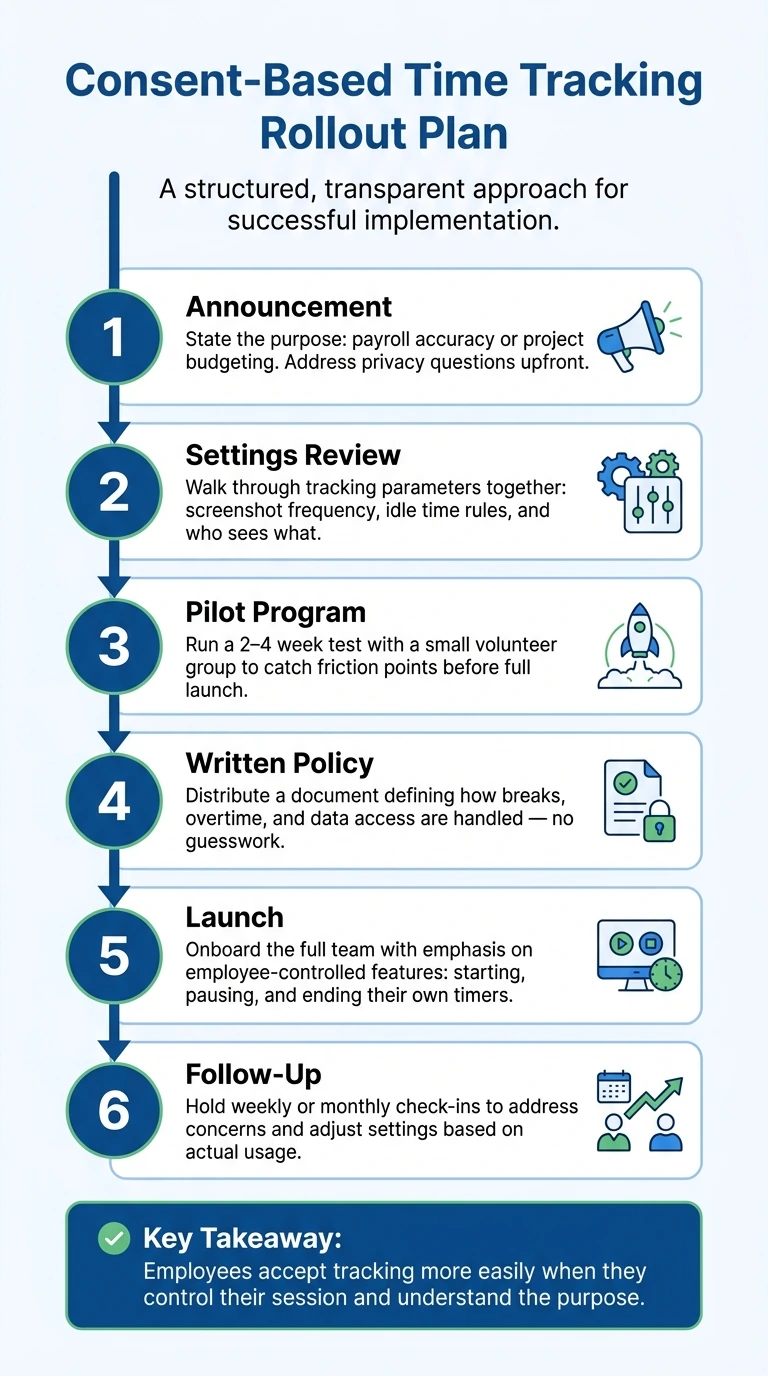
A structured rollout doesn't have to be complicated. It just needs to be deliberate. Each step should give employees clear information and some level of control before the system goes live.
Once pay concerns are handled, the rollout itself needs to back up that trust.
| Rollout Step | Consent-Based Practice |
|---|---|
| Announcement | State the purpose: payroll accuracy or project budgeting. Address privacy questions upfront. |
| Settings Review | Walk through tracking parameters together: screenshot frequency, how idle time is defined, who sees what. |
| Pilot Program | Run a 2–4 week test with a small volunteer group to catch friction points before the full launch. |
| Written Policy | Distribute a document that defines how breaks, overtime, and data access are handled - no guesswork. |
| Launch | Onboard the full team with emphasis on employee-controlled features: starting, pausing, and ending their own timers. |
| Follow-up | Hold weekly or monthly check-ins to address concerns and adjust settings based on actual usage. |
A rollout gets more buy-in when employees can check their pay, read the rules for themselves, and control their own tracking.
Conclusion: Teams Accept Tracking When Control and Purpose Are Clear
Pushback usually starts in familiar places: fears about surveillance, a fuzzy purpose, worries about pay, or a rollout that feels rushed. Any one of those mistakes can spark resistance.
The way through it is simple: give employees control and spell out the purpose. When tracking feels like a shared process instead of something done to people, employees take part in it rather than just put up with it.
That idea has to show up in the rollout too. Start with a pilot. Put the rules in writing. And give employees access to their own data from day one.
AllyTracker is built around that approach. Employees control their own timers, review screenshots before they're shared, and can see their own dashboards. Managers get approved screenshot galleries and verified-pay timesheets.
When the purpose is clear and employees have real control over the process, tracking works.
How do I introduce time tracking without hurting morale?
Time tracking works best when people see it for what it is: a scheduling and payroll tool, not a way to watch every move.
Keep the scope simple. Measure the basics tied to work time, such as:
- when a shift starts
- when it pauses or breaks
- when it ends
- total hours for payroll and scheduling
That gives managers what they need to plan coverage, approve hours, and run payroll without turning the process into something heavy or intrusive.
A consent-based setup helps a lot. Employees should be able to start, pause, and stop their own timers. Before anything is submitted, they should also be able to review what will be shared. That small step changes the tone. It makes the process feel clear and fair instead of one-sided.
Trust also grows when the rollout is light and easy to follow. A short training session, a quick pilot, and plain-language explanations can go a long way. People should know what the tool records, what it does not record, and how the information will be used.
It also helps to show the upside for employees, not just managers. Personal dashboards and approved timesheets let people check their own hours, spot mistakes early, and feel more in control of the process.
What should a time tracking policy include?
A good time tracking policy should put transparency and mutual consent front and center.
It needs to spell out why time is being tracked, how that data will be used, and what control employees have over it. That matters. People are far more likely to accept tracking when the rules are clear and there are no gray areas.
The policy should also give team members room to manage their own tracking. That can include:
- Starting, pausing, and stopping timers themselves
- Reviewing screenshots before sharing them
- Using personal dashboards to check their own data
That kind of control helps tracking feel less like surveillance and more like a shared system with clear boundaries.
How can employees verify their tracked hours?
In AllyTracker, employees can check their tracked hours before anything gets shared. They can review session details, look over any captured screenshots, and make sure the time looks right. They can also open their personal dashboard to get a clear snapshot of tracked time.
Once the employee has reviewed and approved that information, managers receive a screenshot gallery and verified timesheets based on what the employee authorized.